

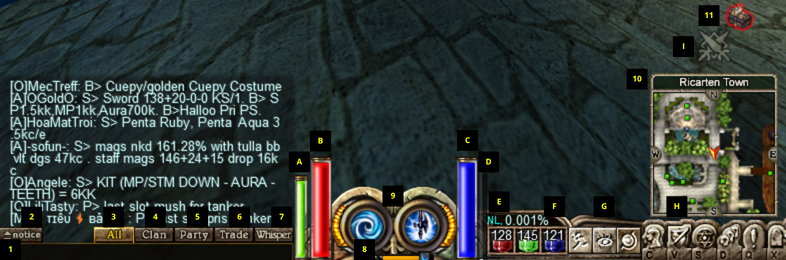
| # | Details |
| 1 | Chatbox input area. Press Enter to activate it. |
| 2 | Notice switch. It shows the drops you and your party pick up, and also monster counts during quests. Click on it to cycle through the 3 diplay modes. |
| 3 | "All" chatbox mode. Display : messages from all chat modes. Typing : only to people near you. |
| 4 | "Clan" chatbox mode. Display : only clan chat messages. Typing : only to people in your clan. |
| 5 | "Party" chatbox mode. Display : only party chat messages. Typing : only to people in the party. |
| 6 | "Trade" chatbox mode. Display : only trade chat messages. Typing : to everyone in the server who has activated the display of Trade Chat. (see settings window guide) |
| 7 | "Whisper" chatbox mode. Display : only private messages. Typing : only to people near you. To send a private message, see the commands guide. |
| 8 | The progress bar shows the time of the day. On the left side is the sun, on the right side is the moon. Sun on, bar full : middle of the day. Moon on, bar full : middle of the night. |
| 9 | Display of the primary (left click) and secondary (right click) skills. |
| 10 | Mini map box. Shows the current map name and your position. |
| 11 | Treasure Chest Icon. Shows time left and location for the next Treasure Chest to spawn |
| A | Stamina bar. Shows how many stamina points you have left. (Skills and running uses stamina) |
| B | Health bar. Shows how many health points you have left. If it goes empty, you will die. |
| C | Mana bar. Shows how many mana points you have left. (Skills use mana) |
| D | Experience bar. Shows how close from the next level you are. |
| E | TNL (to next level) displays the percentage of how much experience needed for the next level you have. |
| F | Quick potion slots. Use potions by pressing 1,2,3. For detailed information, see the commands guide. |
| G | Quick toggles : run/walk, camera mode, and map on/off. |
| H | Quick menu buttons : character info, inventory, skills, party, quests, settings. You can also use shortcuts to open them : C,V,S,T, D,Q,X. |
| I | War Mode : Become hostile, enabling PvP everywhere to get EXP, Drop, GEXP boosts. |
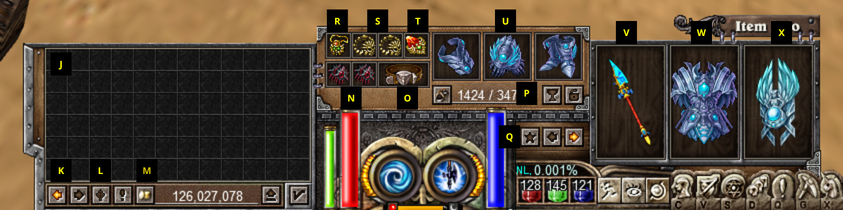
| # | Details |
| J | Your inventory. If the inventory window (V) is closed when you pick an item, it goes here automatically. |
| K |
Buttons to go from inventory page 1 to 2. You can also press E to do this. Press  to open the quest inventory. to open the quest inventory.
|
| L | Your materials. Herbs and Ores collected or fish caught go here. These items stack by kind. |
| M | Your gold. On the right : display of how much gold you have with you. On the left : button to drop gold on the floor, or to transfer to warehouse (if you have opened the warehouse npc). |
| N | Your Earrings: These will increase your HP, SP, MP and other stats. |
| O | Belt: There are various types of Belts, each providing specific attributes. They contribute to your Attack, Defense, Potion Storage, etc. |
| P | Inventory lock (Press L) & Relic Case (Press G). When your inventory is locked you can't take items on the floor, and you can't touch the items in your inventory. Relic Case is where your Boss Relics are registered. |
| Q | Weapon slot switch (Press W) & Skins Slot (Press F). Switches between your two weapon+shield slots. It allows you to have two setups : a one-handed weapon + shield on one side, and a more powerful two-handed weapon on the other side. Skins slot is where you equip your preferred skins. |
| R | Amulet slot. Place your amulet here, for increased mana, mp regen, etc. |
| S | Ring slot x 2. Place rings here for increased stamina, hp regen, etc. |
| T | Sheltom slot. Place a sheltom here for more hp and mp regen. |
| U | Bracelet, Gauntlets & Boots slots: These items will increase your defensive stats, including Defense, Absorption and Elemental Resistance. Additionally, they grant extra Potion slots, Attack Rating and Movement Speed. |
| V | Weapon slot. |
| W | Armor slot. |
| X | Shield slot. Note that if you use a two-handed weapon, this slot will not be usable. |
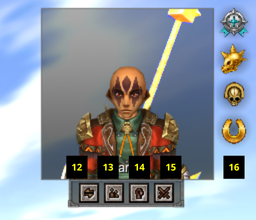
| # | Details |
| 12 | Trade Request: Sends a trade request to the selected player. |
| 13 | Party Request: Sends a party request to the selected player. The level difference must be 25 or less. |
| 14 | Add as a friend button. Adds the selected player to your friend list. Press D to open friend list (community window). |
| 15 | Duel Request. Sends a duel request to the selected player. Duels are one-versus-one and allow you to place a Wager. |
| 16 | Character Trophies. Displays all the PvE and PvP trophies a character has. |
-
 4
4